

Numpad Hand Position: Correct Numeric Keypad Finger Placement
Learn the correct numpad hand position, numeric keypad finger position, and a practical 10-key learning sequence. The goal is to enter numbers accurately by touch with a stable right-hand home position instead of looking down at the keypad.
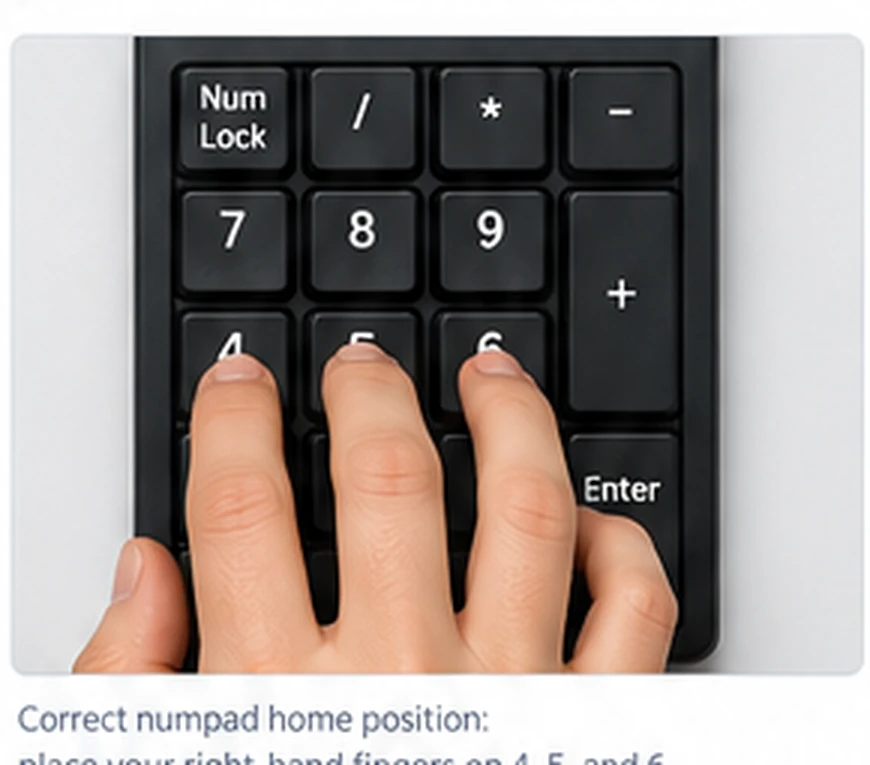
Place your right index, middle and ring fingers on 4, 5 and 6. Use the index finger for 1-4-7, the middle finger for 2-5-8, the ring finger for 3-6-9, the thumb for 0, and the little finger for Enter and operator keys as needed.
What is the numpad?
The numpad, also called the numeric keypad or 10-key pad, is the calculator-style number section usually found on the right side of a full-size keyboard. Its compact layout is designed for repeated number entry, which is why it is common in accounting, billing, data entry, stock work, spreadsheets, point-of-sale systems and other number-heavy tasks.
The layout is different from the number row above the letters. On a numpad, the digits form three vertical columns around a central 5 key. Learning those columns by touch lets your hand stay in a small area instead of travelling across the top of the keyboard.
Why correct numpad hand position matters
Good numpad finger placement reduces unnecessary movement. Instead of using one finger for every digit, each finger stays responsible for a predictable column. This helps build muscle memory, makes it easier to recover your position after pressing Enter or an operator, and gives you a repeatable technique for speed practice.
- Faster number entry: less hand travel between keys.
- Better accuracy: each finger has a consistent job.
- Touch control: the raised mark on 5 helps you find home position without looking.
- Progressive learning: you can master one column at a time before mixing the full keypad.
Correct numeric keypad finger position
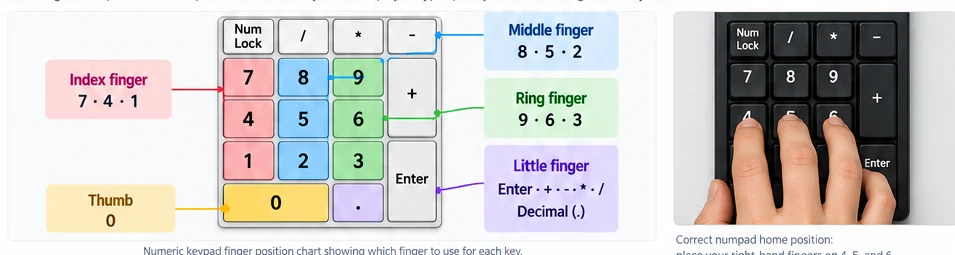
The standard starting pattern is simple: index, middle and ring fingers cover the three number columns, while the thumb and little finger help with the lower and operator areas.
Finger-to-key map
- Right index finger: 1, 4, 7 — rest on 4.
- Right middle finger: 2, 5, 8 — rest on 5.
- Right ring finger: 3, 6, 9 — rest on 6.
- Right thumb: 0.
- Right little finger: Enter, +, -, *, / and decimal as needed.
Numpad home position: 4, 5 and 6
Your numpad home position is 4-5-6. Place the right index finger on 4, the middle finger on 5, and the ring finger on 6. Most physical keyboards put a small raised mark on the 5 key. Use that tactile mark the same way touch typists use the raised marks on F and J: it helps you relocate your hand without looking.
Keep the wrist relaxed and avoid pressing harder than necessary. The hand should remain stable while the fingers move up to 7-8-9, down to 1-2-3, and then return to the 4-5-6 home position.
How to practise 10-key typing step by step
Do not begin with random full-keypad sequences. A progressive course is easier because each stage keeps the previous keys while adding a small new challenge.
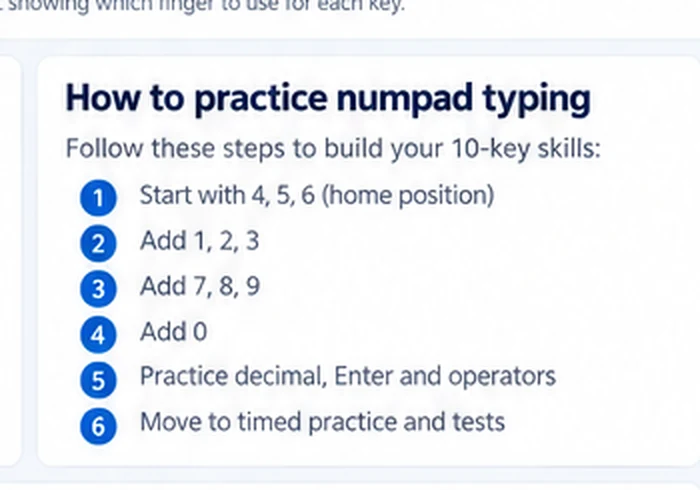
- Start with 4, 5 and 6. Practise finding home position without looking.
- Add 1, 2 and 3. Move each finger down and return to home.
- Add 7, 8 and 9. Move each finger up and return to home.
- Add 0. Use the right thumb while the three main fingers stay oriented around 4-5-6.
- Add decimal, Enter and operators. Introduce these only after number placement feels reliable.
- Move to realistic sequences. Practise prices, dates, account-style numbers, quantities and decimal values.
- Measure speed and accuracy. Use the Numpad tests after the key positions feel automatic.
How to use the numpad without looking
The key is not speed at first; it is position recovery. Before every short practice run, find the raised 5 key, settle the index-middle-ring fingers on 4-5-6, and then type while keeping your eyes on the source text or screen. If you lose position, pause and relocate 5 instead of searching visually for every number.
Short accurate sessions are better than long sessions filled with guessing. When your fingers repeatedly return to the same home position, speed usually becomes easier to build.
10-key typing practice for work and data entry
Real numeric work rarely consists of isolated single digits. Once you know the layout, practise realistic formats such as prices, invoice numbers, dates, percentages, measurements, account codes and decimal values. This teaches you to maintain rhythm while reading a source and entering data.
If your goal is data-entry speed, also read 10-Key Typing Test: What Is a Good KPH and Accuracy?. KPH (keys per hour) is often more useful than WPM for purely numeric work.
What if your keyboard does not have a numpad?
Laptops and compact keyboards sometimes omit the physical numeric keypad. You can still learn the layout with on-screen practice, but a physical numpad is better for true touch movement because your fingers receive real key spacing and tactile feedback. An external USB or Bluetooth numeric keypad can provide the same basic 10-key layout without replacing your keyboard.
TypingTutor.Online's Numpad Course is useful for understanding key order and progression even if you are practising on a smaller device first.
Learn numpad typing online
The Numpad section is designed as a complete learning path rather than a single speed test. Start with guided lessons, continue with games for repetition, and then use timed tests when your finger placement is stable.

Start Numpad Course Play Numpad Games Take a Numpad Test
Frequently asked questions
What is the correct numpad hand position?
Place the right index, middle and ring fingers on 4, 5 and 6. From there, index covers 1-4-7, middle covers 2-5-8, ring covers 3-6-9, the thumb reaches 0, and the little finger handles Enter and operator keys as needed.
Which fingers are used on the numeric keypad?
Use the right index finger for 1, 4 and 7; the right middle finger for 2, 5 and 8; and the right ring finger for 3, 6 and 9. The thumb normally handles 0. Enter and the operator area are commonly handled by the little finger depending on the keyboard and task.
What is the numpad home position?
The home position is 4-5-6. The raised mark on 5 is the main tactile reference point for returning your hand to the correct position without looking.
How can I learn numpad typing online?
Use a progressive sequence: 4-5-6 first, then 1-2-3, then 7-8-9, followed by 0, decimal, Enter and operators. You can start free with the TypingTutor.Online Numpad Course.
What if my keyboard does not have a numpad?
You can practise the layout on screen or connect an external numeric keypad. For learning true touch movement and measuring speed, a physical numpad is preferable.
Start with the home position, complete the progressive lessons, then move into games and timed tests.