

Daily progress
- Daily practice goals
- Typing streaks
- Personal bests
- Weak-key practice
TypingTutor.Online for Chrome is a free typing tutor for beginners who want a simple, structured way to learn touch typing without constantly switching between websites and tabs. The extension brings beginner lessons, Smart Practice, typing tests, typing games, numpad training, progress tracking and daily practice tools into one focused learning workspace.
It is designed for complete beginners, students, people learning keyboard skills, office users and anyone who wants to improve typing accuracy before pushing for higher speed.
Learning to type is easier when new keys are introduced gradually. The extension includes a 24-lesson beginner course that starts with basic home-row positioning and adds new keys step by step.
Each beginner lesson uses a structured 6-minute practice session so learners get enough repetition to build real keyboard familiarity. During a lesson, users can see the active character, on-screen keyboard, lesson progress, time, typing speed, accuracy and errors.
The goal is not to rush. The course encourages accuracy first and steady improvement over time.
Smart Practice provides longer, more natural typing passages instead of relying only on very short drills. Practice can adapt around weak keys and recent performance while still using readable words, sentences and paragraphs.
This makes Smart Practice useful after lessons, between lessons, or as a regular daily typing workout.
The extension includes four focused benchmarks:
Typing tests help learners measure speed, accuracy and errors. Keyboard tests can highlight incorrect words so mistakes are easier to notice and correct.
Typing practice does not always have to feel like a lesson. The extension includes four lightweight games with levels and larger vocabulary sets:
These games reinforce keyboard rhythm, accuracy, speed and numeric keypad control while keeping practice engaging.
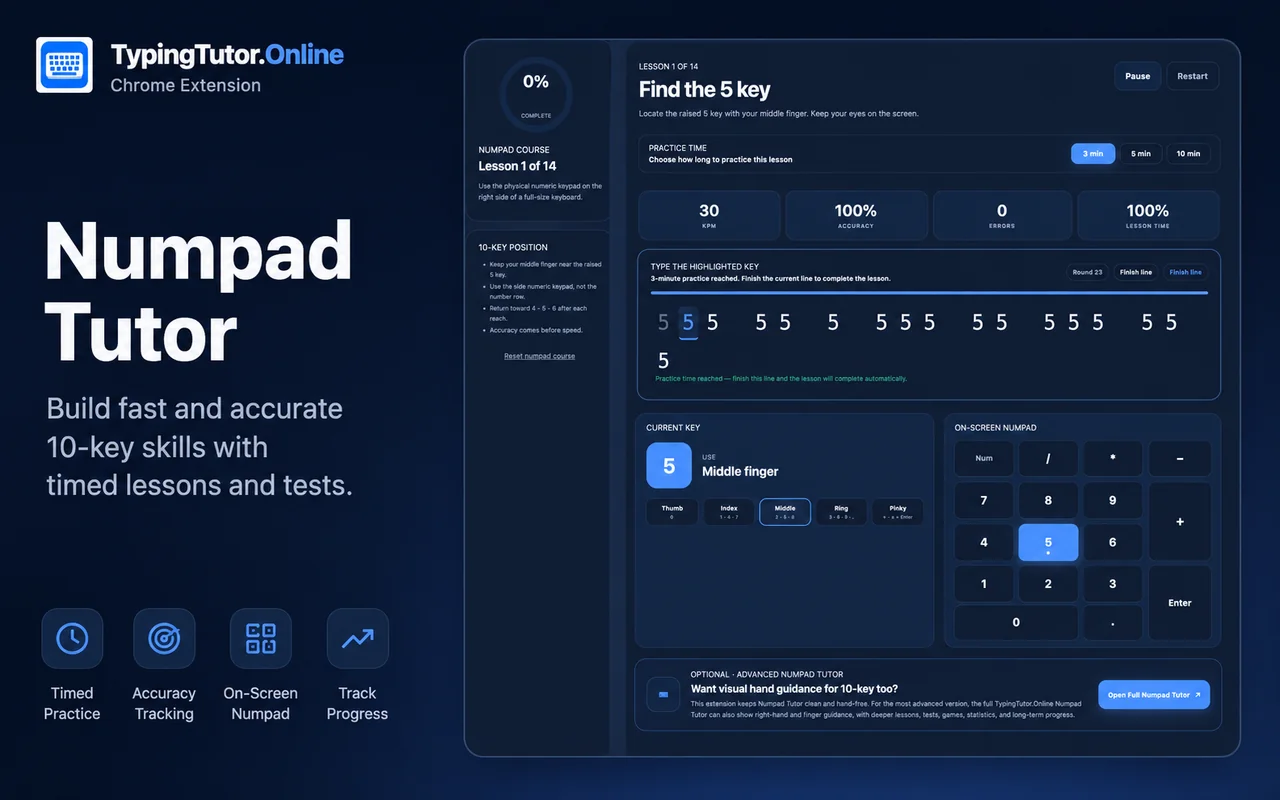
The 14-lesson Numpad Tutor teaches 10-key numeric typing progressively.
The course begins with the numpad home keys 4, 5 and 6. It then adds 1, 2 and 3, followed by 7, 8 and 9, then 0, decimal, Enter and operators. Previously learned keys continue appearing as new keys are introduced.
Learners can choose 3-minute, 5-minute or 10-minute numpad lessons and use the on-screen numpad as a visual guide.
The extension is designed to encourage regular practice instead of one-time testing.
Progress and preferences are stored locally in Chrome.
Users can select useful text from a webpage and open it as typing practice inside the extension. This can be useful for students, office users and learners who want to practice text related to their own interests or work.
The extension supports a clean Light mode and Dark mode. Appearance can be changed from the internal extension sidebar.
The extension is built to work as its own learning workspace. Lessons, Smart Practice, tests, games, numpad training, progress, challenges and settings open inside the extension.
Links to TypingTutor.Online are clearly marked as optional so users visit the full website by choice, not by accident.
TypingTutor.Online may occasionally ask engaged users whether they would like to review the extension. The request appears only after meaningful use and a successful activity. It does not ask for a specific star rating and does not offer rewards. Users can choose “Maybe later,” and repeated dismissals stop future requests.
A good typing habit is built through repetition, accuracy and regular practice. Start with the beginner course, practice a little each day, check your progress with typing tests and use games or Smart Practice when you want variety.
The browser extension is a convenient way to return to short typing activities while working in Chrome. It complements the main TypingTutor.Online website; it is not a replacement for every website lesson, certificate test or learning history feature.
Choose the extension for convenient browser-based drills, its included tests and quick selected-text practice. Choose the website when you need the full 60-lesson regular course, dedicated Speed Improver, certificate testing or the broader game collection. The extension has its own feature set, so do not assume all website account and progress features are available inside it.
Before installing, check the extension permissions, extension privacy details and help guide. The official Chrome Web Store listing is linked above. If an extension action is missing, use the online lesson or test instead.