

14 Premium Typing Games: Which Should You Play?
Choose a typing game for the movement or kind of text you want to practise. TypingTutor.Online has 14 Premium adventures: eight general typing games, three Kids adventures and three Numpad games. This guide groups them by practice goal and explains the main control pattern, so you can select a useful session without reading 14 separate guides first.
Playing these games requires active Premium access or covered school access. The articles and game instructions are publicly readable. Both personal Monthly and Yearly plans include the same games; compare Free and Premium for the wider package.
Choose a game by practice goal
Scroll the table sideways on a small screen to read all columns.
| Your practice goal | Games to consider | What to expect |
|---|---|---|
| Complete word targets under time pressure | Typing Interceptor, Typing Rocket, Typing Birds | Select an approaching target and finish its word. |
| Switch between letters and words | Advanced Typing Soldier, Typing Food Express | Use single letters for one task and complete words for another. |
| Explore words, names and short phrases | Typing Quest, Ocean Explorer | Build a collection while typing meaningful prompts; calm modes are available. |
| Read a situation before typing an answer | RoadWise | Work with US-style signs and decisions, with knowledge and typing scores separated. |
| Follow a child-friendly story or discovery task | KeyQuest, CosmoKeys, DinoDig | Type to restore gardens, protect planets or uncover fossils. |
| Practise numeric read–type–confirm work | CargoScan, VaultRunner, Checkout Champion | Enter codes, prices or quantities and confirm them. |
These are practice suggestions, not a ranking of which game teaches typing fastest. Begin with keys you have already learned. If a prompt uses unfamiliar movements, review a suitable typing lesson or Numpad lesson first.
Eight typing adventures
Typing Interceptor
Each approaching drone carries a word. Type its first letter to select it, then finish the word to intercept it. Choose this for complete-word entry and keeping track of a selected target while other words approach.
Typing Rocket
Select an incoming rocket with its first letter and complete the word before impact. The city has three districts to defend. It suits word practice with an extra decision about which target needs attention first.
Typing Birds
Type the words carried by birds before they reach the garden basket. The setting uses nature vocabulary and a visible food supply. Try it when you want word-target practice with a garden theme.
Advanced Typing Soldier
Press a displayed target letter to fire, then type a complete reload word when you need more rockets. Choose it to alternate between recognising individual letters and typing connected words. Read the current mode before responding.
Typing Food Express
Single letters on fuel pickups keep the truck moving, while words above birds help protect its fruit. This mixes two input tasks in a journey setting. Watch whether the current target needs one letter or a whole word.
Typing Quest
Type a trail clue, reveal an animal and complete a photo prompt to add a discovery to your journal. Later prompts include short phrases. Its calm exploration option is useful when you prefer to focus on reading and accurate entry with less countdown pressure.
RoadWise
Read US-style signs and short road situations, choose an answer and type it. The game records correct knowledge choices separately from typing accuracy. Pick it when you want practice that involves understanding the prompt before entering text.
Ocean Explorer
Type sea-life names to add illustrated discoveries to underwater scenes. Targets range from short names to longer phrases, and a calm mode is available. Choose it for connected vocabulary practice with a collection to build.
Three Kids adventures
Choose a game whose words and instructions the learner can understand. A story can make repetition engaging, while a short, manageable session is often easier to fit around a lesson. Older beginners can also choose these settings if they enjoy them.
KeyQuest
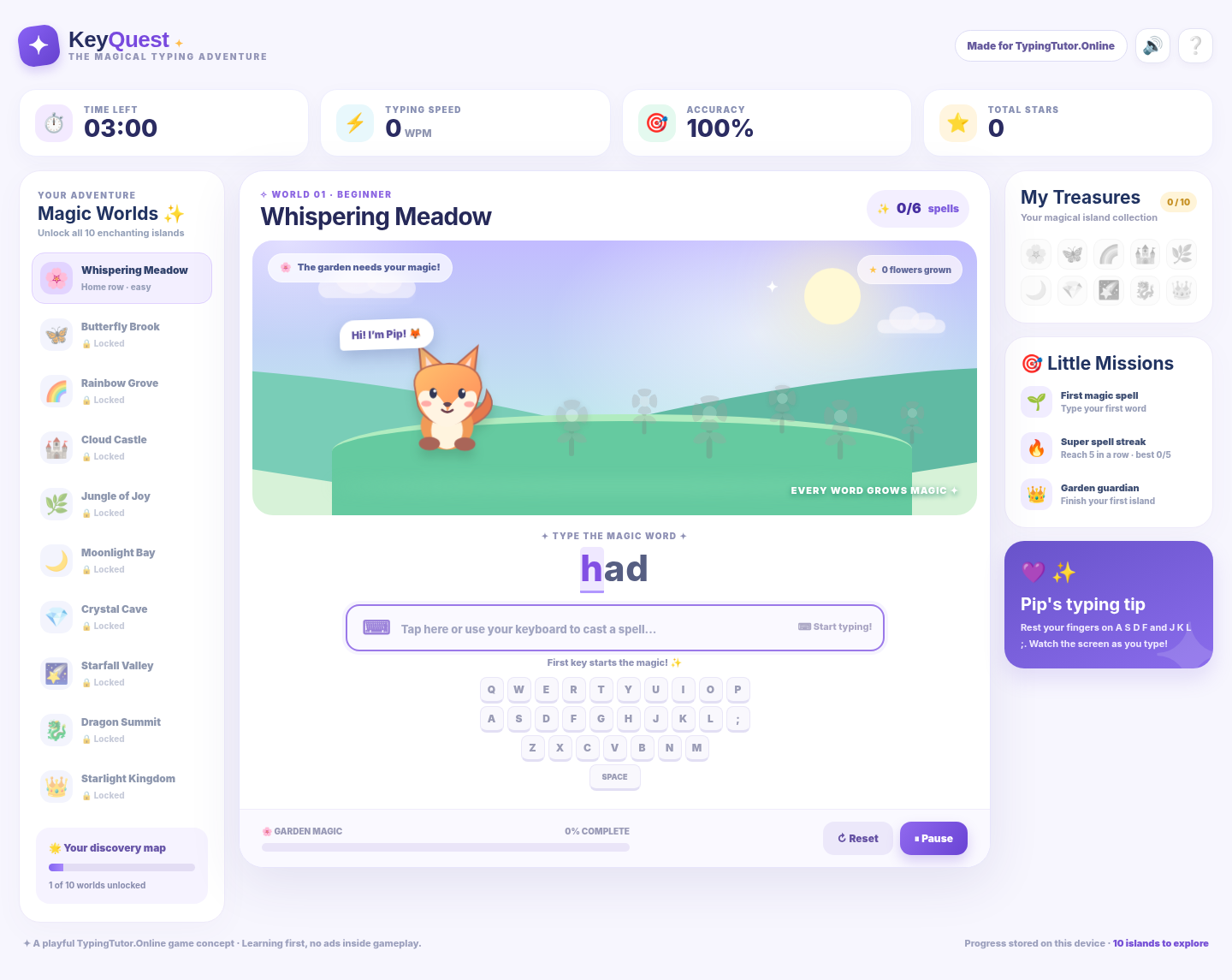
Help Pip restore magical gardens by completing typing targets. The word sets build from familiar patterns towards broader keys and short sentences. Use it for a story-led return to word practice, following the next-character highlight carefully.
CosmoKeys
Type meteor words to protect a planet, then answer a space-science checkpoint during the mission. Typing time pauses for the question. It combines word-target practice with a separate moment to read and think.
DinoDig
Complete words to uncover fossil tiles and build dinosaur discoveries across dig sites. Science checkpoints add another learning activity between typing tasks. Choose it for a discovery theme rather than continuous target defence.
Three Numpad adventures
A physical number pad with Num Lock enabled is useful for learning keypad movement. These games also offer on-screen numeric controls, and the ordinary number row is supported where described on the game page. Check whether the next field asks for a code, a price or a quantity.
CargoScan
Read a shipment code, enter its digits and press Enter or Scan to dispatch the package. Early stages begin with 4, 5 and 6 before adding more digits and decimal codes. It fits practice of a steady read–type–confirm sequence.
VaultRunner
Enter lock sequences and confirm them to open vaults and collect relics. Completing a code clears a lock; the game has further locks and career stages to work through. Choose it for repeated numeric sequences with a puzzle-adventure setting.
Checkout Champion
Enter the displayed item price and confirm it. Later stages also ask for quantities, so the entry label matters. It is useful for practising decimal values and changing between two kinds of numeric field in a market setting.
How to make a game session useful
- Choose one goal. For example, finish words more steadily or reduce mistakes in numeric codes.
- Read the controls. Some games select a word by its first letter; others need Enter to confirm a numeric field. Correction and pause controls vary.
- Use familiar keys first. Return to the course when missing key knowledge is interrupting every target.
- Use the available pace options. For a calmer session, consider the exploration modes in Typing Quest or Ocean Explorer. Other games have their own timers and progression.
- Review repeated errors. A result is more useful when it tells you what to practise next. Premium learners can also review recorded game activity in the detailed Statistics dashboard.
- Return to ordinary text. Use a short passage or suitable test later to check whether control carries into the kind of typing you need.
For an illustrative short routine, complete a focused lesson, play one suitable game and note one recurring difficulty. Repeat on another day with a similar task. You can stop earlier or split the practice time rather than forcing a full run through every level.
How should you compare game results?
Compare similar attempts in the same game first. Scores may reflect different tasks, levels, shields, collections or numeric entry. Numpad results may use character-based measures rather than ordinary word WPM. A higher score in one game does not automatically mean faster typing than a different game.
For a separate typing-speed check, choose a suitable typing test or Numpad practice/test route and keep the device, text difficulty and duration comparable. Look at accuracy alongside speed.
Frequently asked questions
Are all 14 games included with Monthly and Yearly?
Yes. Active personal Monthly and Yearly Premium plans include the same 14 games. Covered school access also provides Premium learning during the school's paid coverage.
Can I learn typing using only these games?
Games provide varied practice. Structured lessons are still useful for introducing keys and finger movement, followed by words and ordinary text. Use the two together according to your current skill.
Which Premium typing game should a beginner choose?
Choose a game using keys and words you can already type. KeyQuest offers a story-led route, while Typing Quest and Ocean Explorer provide calm exploration options. If most targets are unfamiliar, begin with the course lessons first.
Do these games all work the same way on phones?
Controls vary. The Kids adventures provide mobile typing support, and the Numpad games have on-screen numeric controls. A physical keyboard is the appropriate input device when your goal is computer touch typing. Follow each game's own controls and instructions.
Does Premium immediately open every game level?
Premium gives access to the games. Individual worlds, levels and career stages keep their own progression rules. The separate choose-any-lesson benefit applies to the supported typing courses.
Is game progress the same as a typing certificate result?
No. A game score records that game's activity. Personal typing certificates use their own eligible course or test requirements, which remain the same for Free and Premium learners.
Explore your next practice route
Open the game catalogue · Compare Premium features · View Monthly and Yearly plans · Start free lessons