

Free vs Premium: What You Get
TypingTutor.Online Premium adds more practice choices and detailed feedback to the learning tools you can already use for free. Both personal paid plans include all 14 Premium games, ad-free learning, direct lesson choice, complete statistics, two extra hand-guide styles and four extra keyboard themes. Monthly and Yearly have the same features; Yearly offers the lower price over a full year.
This guide explains what you receive, what remains free and how the features fit into a useful practice routine. You can also compare the current plans.
What remains free?
You can begin with core typing lessons, typing tests and ordinary games without buying Premium. Free learners follow lesson progression where applicable. Free accounts also include automatic progress sync, basic statistics, optional practice reminders, local backup export/import and management of eligible earned certificates.
The free Classic and Side Hands guides provide visual finger guidance on supported lessons. Light/Dark appearance and the standard keyboard colors remain available too. Premium adds options to these tools; the foundations of learning to type remain available through the free route.
Free vs Premium at a glance
Scroll the table sideways on a small screen to read all columns.
| Learning feature | Free account | Monthly and Yearly Premium |
|---|---|---|
| Core lessons, tests and ordinary games | Available, with lesson progression where applicable | Included |
| Choosing lessons directly | Progressive access; Kids parent/teacher options are available | Choose any Main, Kids, Numpad or left/right One Hand lesson |
| Premium games | Outside the Free package | All 14 included |
| Advertising | Ads may appear | Ad-free learning during active paid coverage |
| Statistics | Basic course progress and recent results | Detailed dashboard, charts, filters, key analysis and weekly summaries |
| Hand Guide styles | Classic and Side Hands | Also includes Capsule and Articulated on supported lessons |
| Keyboard colors | Standard colors and automatic Light/Dark | Also includes Ocean Blue, Mint Garden, Lavender Mist and Graphite Gold |
| Support tickets | Standard support | Priority handling |
Automatic account sync, local backups, optional reminders and standard earned certificate management are shared account features. They are not reasons by themselves to buy Premium.
What can you do with Premium?
Choose the lesson you need
Direct lesson choice is useful when you already know some keys, want to review a difficult keyboard row or need to practise a particular skill. It applies to the Main, Kids, Numpad and left/right One Hand courses. You can select a suitable lesson without first completing every earlier lesson.
Choosing a lesson does not mark it complete. The exercise still needs to be practised, and course achievements or personal certificates keep their applicable requirements. Game worlds and stages follow each game's own progression.
Add variety with all 14 Premium games
The package includes eight typing adventures, three Kids adventures and three Numpad adventures. Some focus on word targets, others mix letters and words, and the Numpad games use numeric entry tasks. Our Premium game guide helps you choose by practice goal instead of opening a game at random.
Games give repetition a setting and a goal. Continue structured lessons as well, especially when you are still learning finger movement or unfamiliar keys.
Turn statistics into a practice decision
Open Statistics to review the complete learning dashboard while Premium is active. Activity and time-range filters help you separate lessons, tests, Smart Reviews and games. Charts and summaries show recorded speed, accuracy, practice activity and progress over time.
The Weak-Key Coach includes a keyboard heatmap, keys needing attention, difficult combinations and a weekly learning summary. These are most useful after you have recorded enough suitable practice. A key with very few attempts can still be marked as learning; one mistake is not a reliable description of your ability.
For example, if a key repeatedly causes errors, review its movement in a suitable lesson, practise words containing it, then compare later attempts under similar conditions. Read the weak-key practice guide for a step-by-step routine. Recording more data does not automatically improve the skill; use the feedback to choose what to practise.
Pick a hand style and keyboard colors that suit you
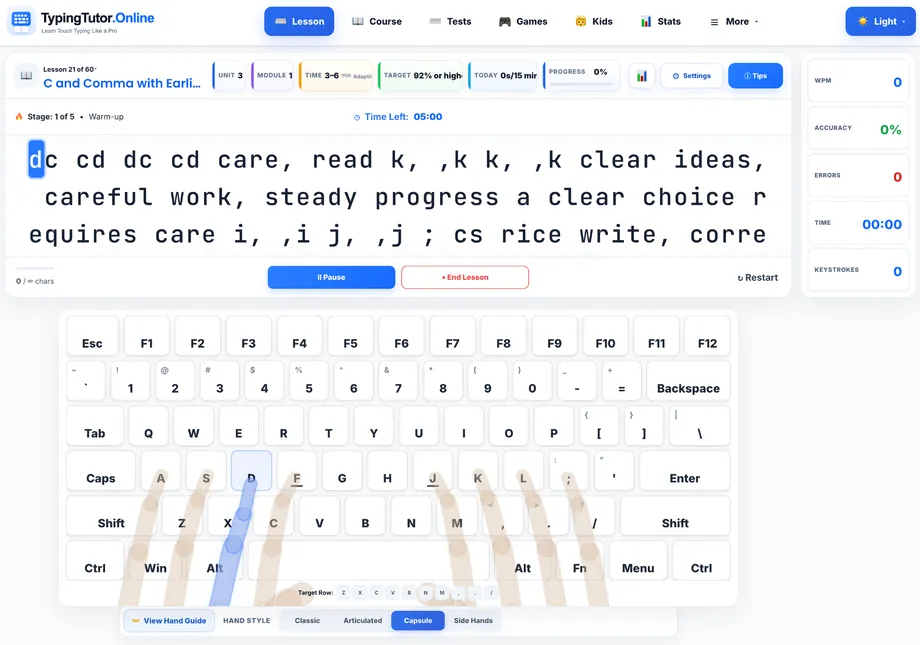
Capsule and Articulated are optional Premium visual styles on supported lesson pages. They present finger guidance differently from the free Classic and Side Hands views. Try the style you find easiest to follow, then gradually rely more on remembered key movements as they become familiar.
The illustrated Hand Guide article shows the actual styles and explains how to select them. The four additional keyboard palettes offer another way to adjust the learning view. A different color or hand style is a preference, rather than a promise of a particular typing speed.
Practise without ads and use priority support
Active Premium coverage provides ad-free learning. Priority support gives your support tickets priority handling. You can open support from your account when you need help with the platform; it is not a live personal tutoring service or a guaranteed response-time promise.
Monthly or Yearly: what changes?
Scroll the table sideways on a small screen to read all columns.
| Plan | Listed price in USD | Billing and value |
|---|---|---|
| Monthly | $5 per month | Billed monthly; 12 monthly payments total $60. |
| Yearly | $36 per year | Billed yearly; equivalent to $3 per month, saving $24 or 40% against 12 monthly payments. |
Both plans provide the same Premium features. Choose the interval that fits how long you expect to use them. The monthly equivalent shown for Yearly is a comparison: the listed yearly amount is billed as a yearly payment.
Use Plans & features for the current options and your account's available purchase controls. After a confirmed purchase, review your coverage and renewal status under Subscription & billing. The site also publishes its subscription terms and refund policy.
How do history and cloud protection work?
During active Premium access, the detailed dashboard can show up to 12 months of available saved activity. Each activity has its own record limits, so this is not a promise that every attempt from an entire year will remain available. Some individual charts also use shorter rolling windows.
Paid coverage protects your saved cloud progress during the paid period and for at least 30 days afterward. Premium features and ad-free access end when paid coverage ends. Cloud sync maintains one current progress copy; it is not an archive of every past version. Local backup export/import remains useful and is available with free accounts too.
Who may find Premium useful?
- Regular learners who want ad-free practice and more game choices.
- Learners reviewing specific skills who want to choose a later course lesson directly.
- People who use feedback to plan practice around repeated key errors, accuracy and recent activity.
- Learners who prefer the extra visual options, including Capsule, Articulated and the additional keyboard palettes.
If you are still deciding whether typing practice fits your needs, begin with the free lessons and a manageable routine. You can choose Premium when a specific additional feature becomes useful. Buying a plan alone does not guarantee a higher WPM, a certificate or a job.
A simple example of using the features
An illustrative ten-minute session could be one minute finding your position, four minutes on a suitable lesson, three minutes in a game using familiar keys and two minutes reviewing results. Shorten, split or change the session to suit your attention, comfort and the activity.
Choose one useful next step from the feedback. If the same letters keep causing trouble, return to the relevant lesson. If accuracy stays steady, try a more varied passage later. Compare progress using similar text difficulty, keyboard and test duration rather than chasing a different score every time.
What about schools and classrooms?
Personal Monthly and Yearly plans are for personal learning accounts. School plans provide the separate classroom tools, student seats, teacher reports and institution-issued certificates. Paid school coverage also includes Premium learning benefits for the school account holder and covered students during its paid term.
An ordinary personal subscription does not provide the institution's classroom package. Teachers can review the school features before choosing the route that fits their class.
Frequently asked questions
Do I need Premium to learn typing?
No. Core lessons, tests and ordinary games provide a free starting route. Premium adds ad-free learning, more games, direct lesson choice, detailed statistics and optional visual styles.
Does Yearly include more learning features than Monthly?
No. The personal plans have the same Premium features. The difference is the billing interval and the saving available with Yearly.
Are typing certificates a Premium-only feature?
No. Standard eligible certificates and their management are available with free accounts too. Personal certificate qualification rules remain the same. Institution-issued certificates belong to the separate school module.
Will Premium save every typing result for a year?
The detailed dashboard offers up to 12 months of available history during active Premium access. Individual activities have record caps, and some charts use shorter windows. Cloud sync keeps one current copy rather than every past version.
Does choosing any lesson unlock every game world?
Direct lesson choice applies to the supported courses. Each game has its own rules for levels, worlds and progress, which continue to apply with Premium.
What happens when paid coverage ends?
Premium features and ad-free access end with the paid coverage. The saved cloud copy remains protected for at least 30 days afterward under the retention policy. Your account's billing and storage information explains your current status.
Choose your next step
Compare Free, Monthly and Yearly · Explore the 14 Premium games · Start with free lessons