A–ZAlphabet & symbols
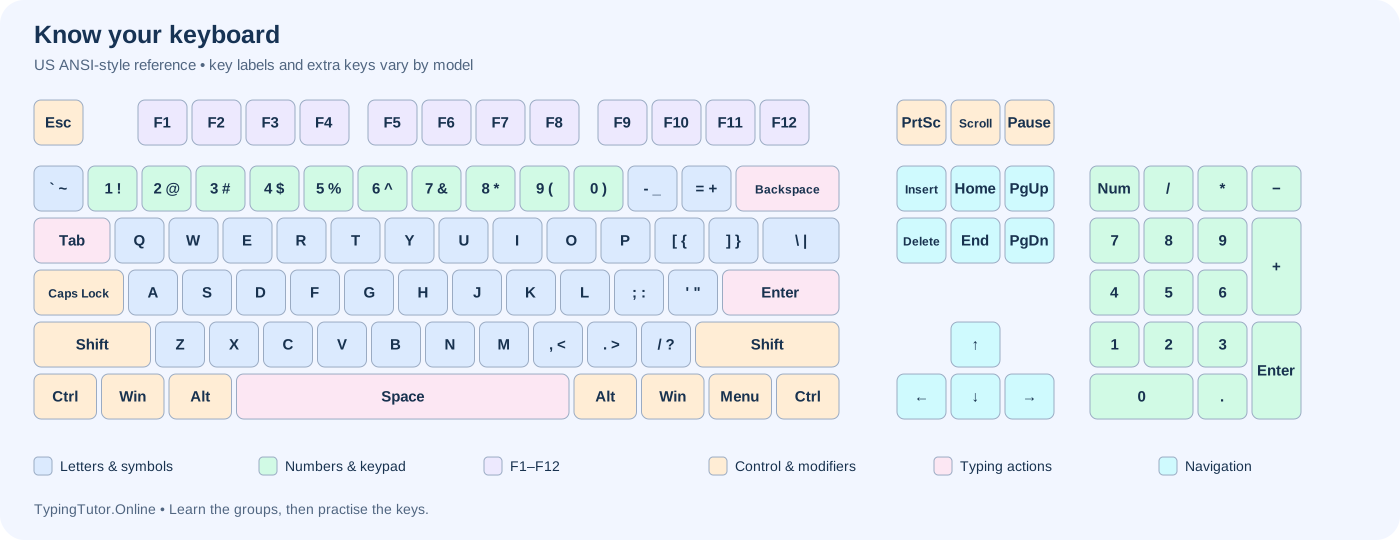
The 26 English letter keys form words. QWERTY describes the first six letters on the upper letter row. Punctuation keys add marks such as commas and full stops. Shift selects the upper printed symbol on many keys; the exact character depends on your input layout.
0–9Numbers & numeric keypad
Use the number row above the letters for digits. A separate numeric keypad puts digits and arithmetic keys together for repeated number entry. Num Lock commonly switches keypad digits and navigation actions on Windows keyboards. Learn the keypad independently: its home position is 4, 5 and 6.
CtrlControl & modifier keys
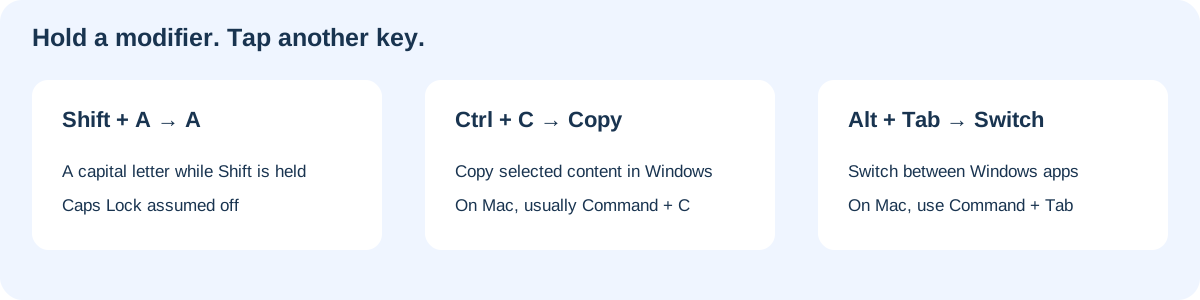
Shift, Ctrl and Alt change the action of another key. Hold the modifier, tap the other key, then release. Windows keyboards usually provide Ctrl and Alt on both sides. AltGr, where present, accesses extra characters and is not simply a second shortcut key. On Mac, Command handles many familiar editing shortcuts; Option is also labelled Alt.
↵Typing & editing keys
Space separates words. Enter starts a paragraph in a text editor or activates a focused control. Backspace normally removes the character before the cursor; forward Delete removes the one after it. A selected text range can be removed by either. Tab moves between controls, or inserts a tab in editors. Shift + Tab commonly moves focus backward.
↑Navigation keys
Arrow keys move the cursor or selection. Home and End commonly move to the start and end of a line in Windows editors; Page Up and Page Down move through larger portions of a document. Context matters: a web page, spreadsheet and text editor may respond differently. Compact keyboards may require Fn combinations.
F1Function & special keys
F1 through F12 send function-key commands whose meanings depend on the app. Esc often cancels a task or closes a menu. Fn selects hardware-layer actions such as brightness, volume or standard function keys. Fn Lock behaviour depends on the keyboard manufacturer.
Shift, Caps Lock and case
Hold Shift for a single capital letter when Caps Lock is off. Caps Lock changes letter case until switched off; it does not normally select the upper symbol on number keys. For example, Shift + 1 produces ! on a US keyboard. Other layouts can behave differently.
Tab, Escape and special controls
Use Tab to follow the focus outline through a form; Shift + Tab goes back. Escape often dismisses a menu or cancels an operation. Insert can switch typing modes in supporting editors. Print Screen behaviour depends on system settings. Scroll Lock and Pause are legacy keys with limited, application-specific uses.